
Bulk Booking Upload
Book up to 100 transfers in one upload.
Fill in one spreadsheet, upload it from your Cars on Demand dashboard, and every transfer is checked line by line before it books. Built for event managers, executive assistants and ground handlers moving guests, delegates, cruise passengers and crew anywhere in Australia.
Up to 100 transfers per upload · Line-by-line error checks · Price-free passenger confirmations
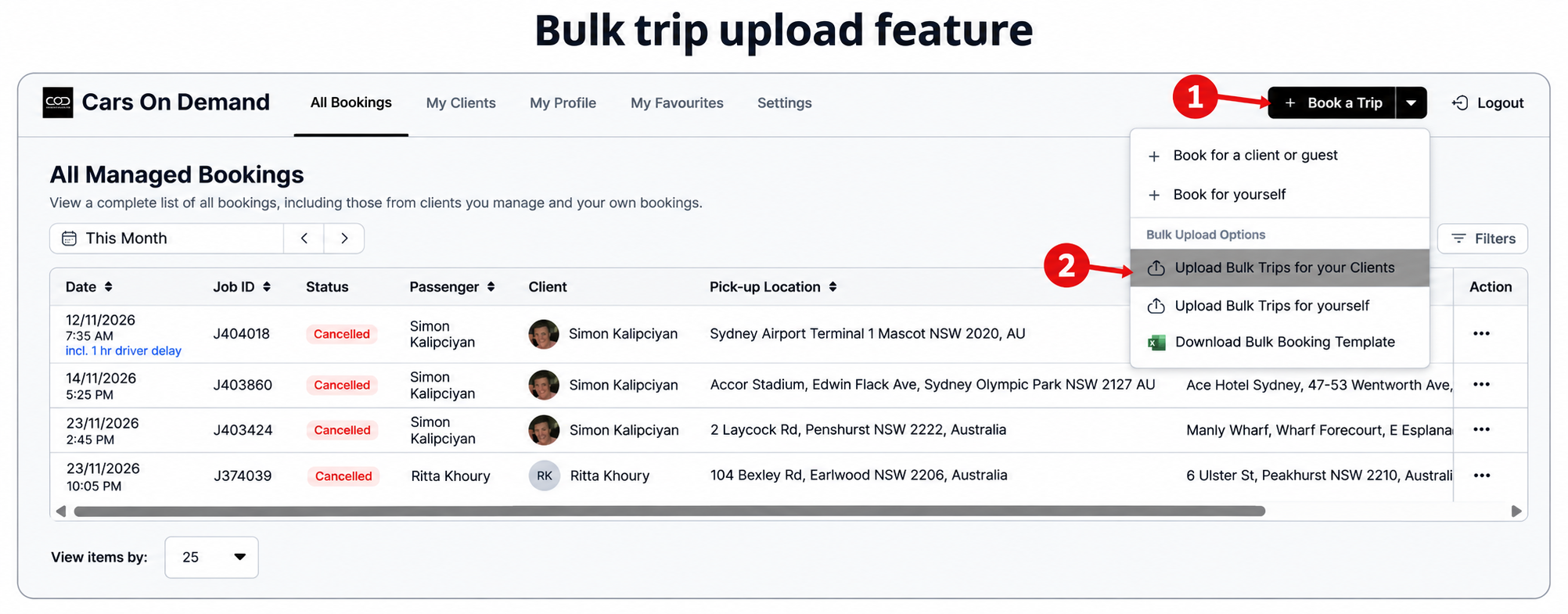
One Spreadsheet. Up to 100 Transfers. One Click.
Download the bulk booking template from your dashboard, add one transfer per row, and upload the whole list at once. It is the most efficient booking upload for anyone who books more than a handful of transfers at a time.
Before anything books, every line is checked. If a row has a missing field or an address we cannot find, the system shows you exactly which booking needs attention. Fix that one line and the rest go through untouched.
Each passenger receives their own confirmation, with no price shown, which is ideal when a company, airline or event is paying. You receive one summary email covering every transfer in the upload.
Booking the same trips again? Reuse the same spreadsheet. An EA booking four transfers for an executive every month can keep one file, change the dates and times, and upload the whole trip in one click.
One spreadsheet. Every transfer. Much less admin.
How bulk upload works
Four steps. That is it.
Step 1
Click the arrow beside Book a Trip and download the Bulk Booking Template.
Step 2
Add one transfer per row: passenger, pick-up, destination, date, time and vehicle.
Step 3
Choose Upload Bulk Trips for your Clients, or for yourself, and select your file.
Step 4
Fix any flagged lines. Every passenger is then confirmed automatically.
Airline Transfers and Crew Transfers, Tracked Automatically.
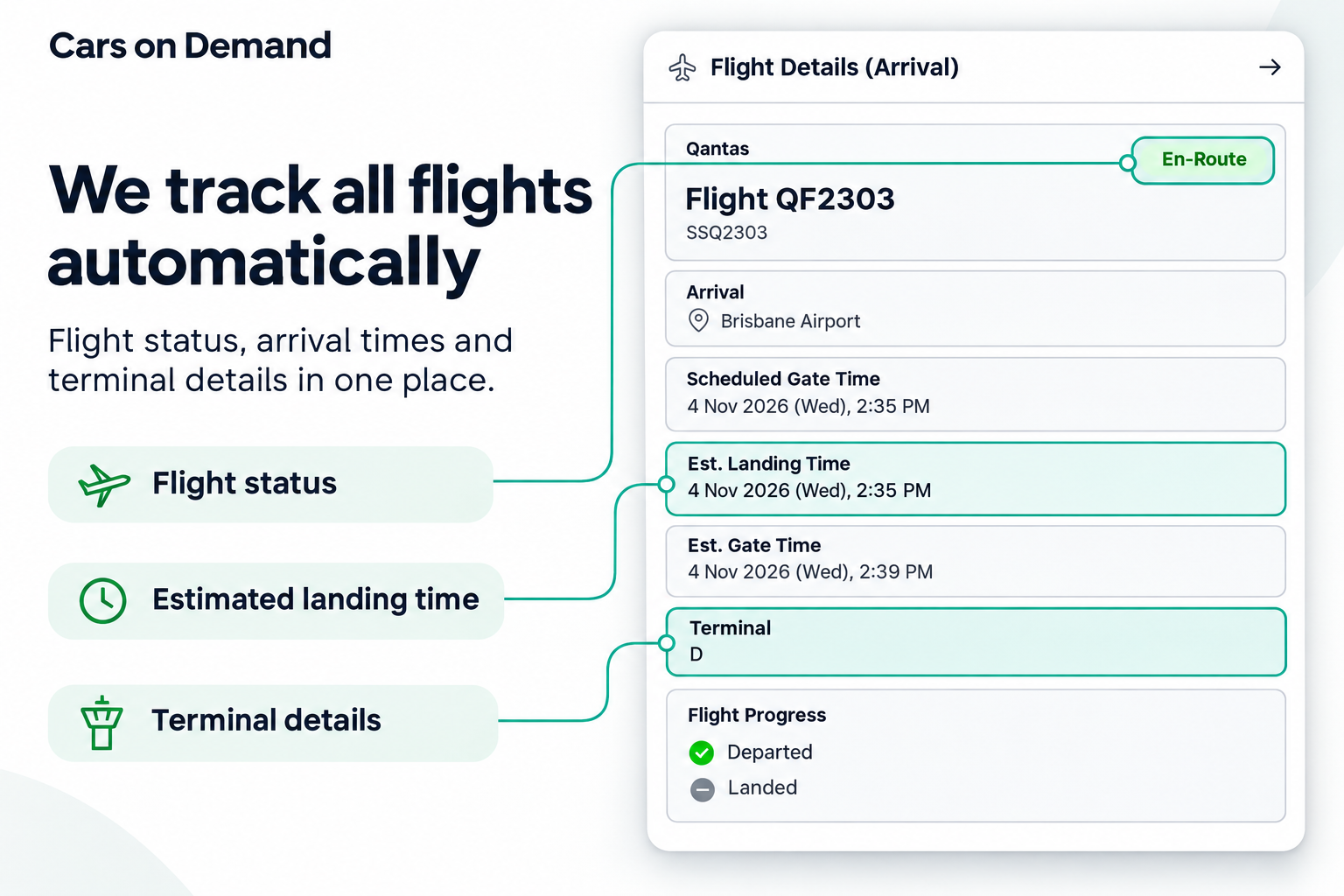
Add a flight number and we watch every arrival for you.
Put the flight number in the Flight Number column, such as QF2, and every airport pickup in your upload is tracked automatically.
If a flight lands early or late, we automatically update the pickup time and tell the chauffeur. Nobody on your team needs to watch fifty arrival boards.
Need extra time after landing? Use the Delay Driver Arrival column to add minutes for customs or a slow bag reclaim, which suits crew rosters and long-haul international arrivals.
Airlines and travel partners running chauffeur programs for premium cabin passengers can upload the day's passenger list in one go, with every flight tracked.
It is one less thing to monitor for every passenger on the list.
Two ways to book a group
One booking at a time, or all of them at once

Don't waste time entering one booking at a time.
One by one
- Re-typing the same details dozens of times from a manifest or guest list.
- A typo discovered on the day, buried among dozens of separate bookings.
- An inbox full of confirmations to sort through.

Bulk booking upload
- One spreadsheet for every guest, delegate, passenger or crew member.
- Every line checked, with errors flagged before anything books.
- One summary email for you, and price-free confirmations for passengers.
Bulk upload does not change the service your passengers receive. It changes how long it takes you to book it.
Built for
Event transfers, cruise ship transfers, airline and crew transfers

Event transfers
Conferences, product launches, gala dinners and sporting events. Upload your guest transport list in minutes, and when the run sheet changes, update the affected rows and upload again.

Cruise ship transfers
Work straight from the ship manifest: one passenger per row, the cruise terminal as the pick-up point, and the airport, hotel or home address as the destination.
Airline transfers
Chauffeur programs for premium cabin passengers, with every flight tracked across Sydney, Western Sydney International, Melbourne, Brisbane, Perth, Adelaide, Canberra and Darwin. See our airline partnerships.

Crew transfers
Flight, ship and touring crews follow fixed rosters between airports, ports and hotels. Upload a week of crew movements from one roster, with flight tracking on every airport pickup.
Running a conference, a cruise program or an airline account?
Set up a Corporate Account for centralised billing, consolidated tax invoices and one point of contact for every upload. Talk to our team about volume programs and we will walk you through your first bulk upload.
Why this holds up
Built for volume, backed by 35 years of reliability
100
transfers in a single upload, each one checked.
99.99%
on-time record, tracked since 1990.
~1,500
professional chauffeurs across Australia.
The right vehicle
The right vehicle for every passenger on the list

Executive Sedan
Executives and VIP guests

Premium Sedan
Speakers, VIPs and premium cabin passengers

Mercedes V-Class
Small groups and cruise luggage, one fixed price

Mini Coach
Delegations, crews and conference shuttles
Name the vehicle type on each row of your upload. See the full range on the Fleet page.
Good to know
Tips for a clean bulk upload
One transfer per row
A return trip is two rows: one there, one back. Upload up to 100 rows at a time and split larger programs into batches.
One passenger name per row
Name the lead passenger, then add other travellers in Notes to Driver and set the number of passengers.
Street addresses only
Include suburb, state and postcode. Put unit, apartment or level numbers in Notes to Driver for a more accurate pickup.
Phone numbers starting with + or 0
Type a quote mark first, for example '0412 345 678, so the spreadsheet keeps the leading digit.
Reviews
Trusted by event managers, EAs and travellers
Questions about bulk upload
Frequently asked questions
How many transfers can I upload at once?
Up to 100 transfers per upload. Each row in the spreadsheet is one transfer, and you can upload as many batches as you need.
Where do I get the bulk booking template?
Log in to your Cars on Demand dashboard, click the arrow beside Book a Trip and choose Download Bulk Booking Template. Every column includes a note explaining what to enter.
What happens if there is a mistake in my spreadsheet?
Every row is checked before it books. If a row has an error, you see which booking and what is wrong, so you fix only that line. The rest of your bookings are unaffected.
Will passengers see the price?
No. Each passenger receives a confirmation at the email address on their row, with no price shown. The person who uploaded the bookings receives one summary email covering every transfer.
Can I add extra passengers, a logo or an attachment?
Each row has one passenger name. Add other travellers in Notes to Driver and set the number of passengers. Logos and attachments cannot be added in the upload, but you can add them to any individual booking afterwards.
Can I bulk upload hourly or daily hire?
Not yet. Bulk upload covers point-to-point transfers, and hourly or daily bookings are made individually as usual. For larger programs, see our conference transfers service.


